· 4 min read
Why Your Bolt.new App Works in Preview But Breaks in Production
Bolt.new's preview runs inside your browser, not on a server. When you deploy, the things it quietly supplied go missing, and the app breaks.

Anatoly Silko
Founder, Rocking Tech

The demo was flawless. The signup worked, the dashboard loaded, and you pushed the button to put it live. Then the real site went blank, or the login stopped responding, or a payment failed without a sound. Nothing you built changed between the preview that worked and the launch that didn't. What changed is that the preview was never the live site, and that gap is where the trouble starts.
The preview was running inside your browser
Bolt.new is built by a company called StackBlitz, on a technology it calls WebContainers.
When you watched your app work in the Bolt window, it was not running on a server somewhere on the internet. StackBlitz's own documentation is blunt about it: the code runs entirely inside your browser's sandbox, not on a remote machine.
The sandbox is generous. It hands your app a running server, a place to keep data, and the secret keys it needs, all inside the browser tab, with no setup from you.
The preview looks like production because the sandbox is quietly doing the production jobs on your behalf. Deploy, and those jobs become yours: the running server, the data, the keys all have to come from the real host instead.
When they don't, the app that worked perfectly an hour ago shows a blank screen to your first real visitor.
This exact symptom is named on our Platform Rescue page in plain words: it works in preview but not in production. We assess whether an app in that state can be rescued, needs rework, or should be rebuilt.
Four things that don't make the trip
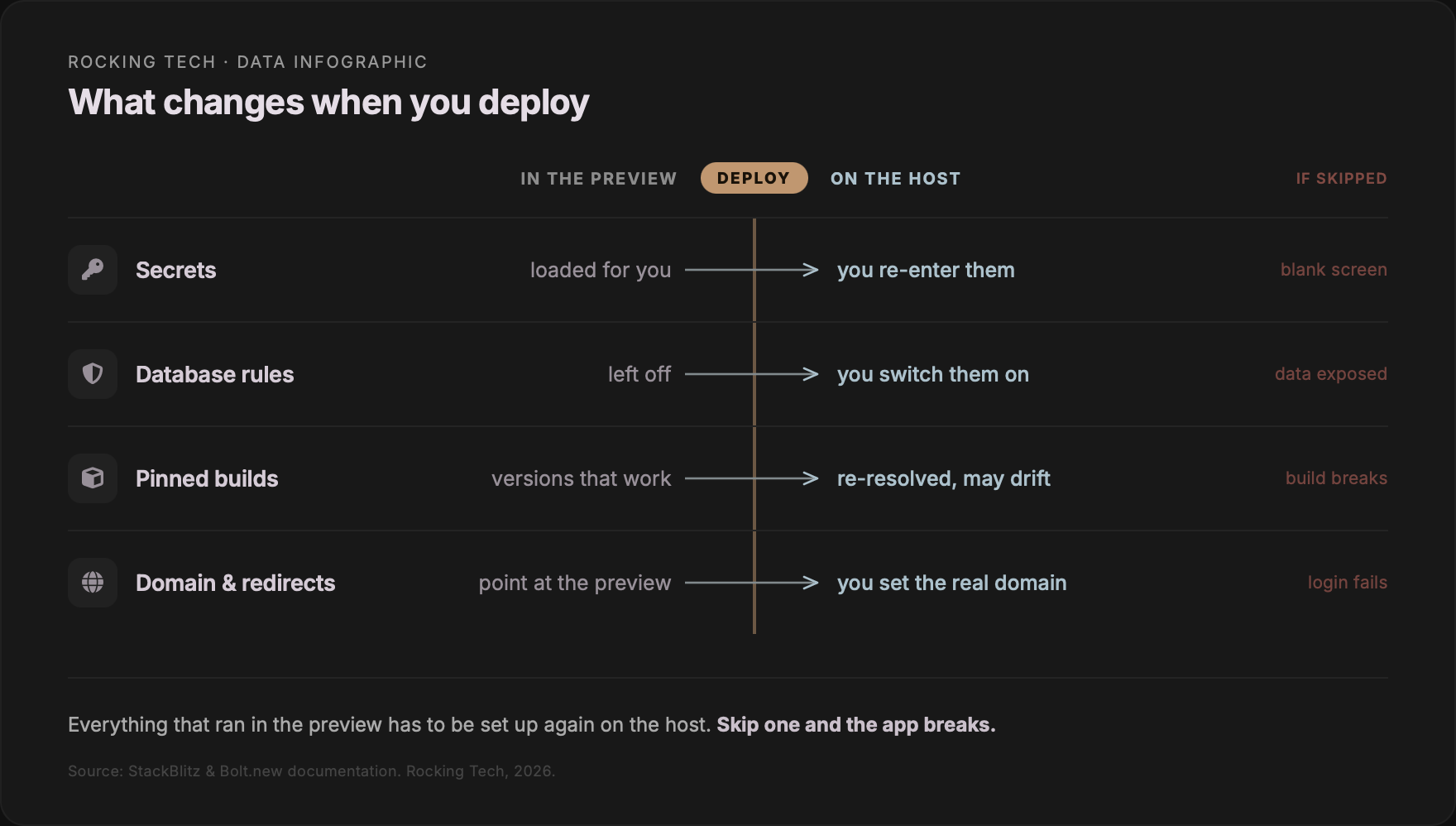
The break usually comes down to four things the preview hid from you.
First, secrets. The API keys and database credentials you entered in Bolt live in Bolt. They don't automatically copy across to your host. So the deployed app starts up with those values missing and falls over before it renders. A blank page with a quiet console error is the classic signature, and Bolt's own troubleshooting docs point to missing variables as the usual cause.
Second, the database. In the preview your data often sits in temporary storage that resets and answers to nobody. In production you need a real database, properly connected, with its security rules switched on. Those rules can ship switched off, which is its own kind of failure: an app that loads fine while leaving its data exposed. Bolt's own troubleshooting docs carry a section for exactly this.
Third, dependencies. Bolt tends to leave version numbers loose. The packages that built a working preview on Tuesday can resolve to slightly different, broken versions when the host rebuilds on Thursday.
Fourth, everything that only matters once a real domain and real users exist: login redirects that point at the preview URL instead of your domain, and cross-origin rules that block calls to your own backend. Neither can surface in a single-user preview. The conditions that trigger them aren't there yet.
Our free App Assessment Call is for the dull first step: working out which of these four you've hit, before anyone quotes you for anything.
Why asking the AI to fix it burns money
The instinct, reasonably, is to paste the error back into Bolt and ask it to sort the deployment out. This is where the credits go.
The builder works on the files inside your project. It has no view of the host you deployed to: not its logs, not its environment settings, not its DNS.
When the real fault is a missing key on your host or a redirect URL your database won't allow, the AI is being asked to fix something it cannot see. So it re-reads your whole project, which costs tokens in proportion to its size, and it guesses.
Bolt's own guidance warns that these error loops eat tokens quickly.
The AI can read every file in your project. It cannot read the server you deployed it to.
We wrote separately about the in-code version of this loop, where each fix breaks something that was working.
The deployment version is harder in one respect. More prompting can't reach the cause, because the cause isn't in the code the model can read.
Assess first, then rebuild
The good news in most rescues is that the bit you care about usually survives. The interface you designed and the flows you validated are generally salvageable.
The work sits underneath them: the data layer, the authentication, the deployment, the production hardening.
Paying for a short, fixed assessment before you commit to a build is not a Rocking Tech invention. It is how serious software gets scoped.
The UK Government's own Service Manual builds a Discovery phase into every project, and says plainly that you do not start building during it. Understand the problem first. And if the honest answer is to stop there, stopping is no failure.
Our Platform Rescue route is priced in the open at every step.
The route starts with a free App Assessment Call. No charge, no obligation, an honest read on whether you need a quick pointer, a proper assessment, or a rebuild.
If you need a fuller diagnosis, the Platform Discovery Sprint is £4,500 plus VAT over three weeks. You get a full codebase assessment, a Code Health Scorecard, a production roadmap, and a 15 to 20 page report that is yours regardless of what you do next.
If the verdict is a rebuild, that becomes a Custom Platform Build: fixed-price, scoped to what the app actually needs, with the Discovery Sprint fee credited in full against it.
A blank screen on deploy doesn't mean the idea was wrong. Bolt is good at getting you to a working demo, and a working demo is worth a lot.
What it can't do is show you the production setup it never did for you. So deploying is the moment you find out it's missing, not before.
Putting that setup in is a different job from prompting your way through it. It's the one worth getting right.
Stuck in the fix‑break‑fix loop?
Book a Platform Rescue Call — 30 minutes, no commitment, no judgement. We’ll discuss your app, confirm whether it’s worth investing further, and give you a straight answer about what you’re dealing with.