· 10 min read
Your AI-Generated Code Isn't Secure — Here's What We Find Every Time
Veracode tested 150+ AI models and found 45% of generated code introduces OWASP Top 10 vulnerabilities. The failure rate for cross-site scripting defences is 86% — and it isn't improving with newer models. Here's what that looks like inside a real codebase, what you can check yourself in 30 minutes, and what the UK's National Cyber Security Centre is now saying about it.

Anatoly Silko
Founder, Rocking Tech

If you built something with Lovable, Bolt.new, Cursor, Replit, or v0 — and it's live, or about to be — six specific security problems are almost certainly sitting in your codebase right now.
That's not opinion. It's the consistent finding across every major independent security study published in the past twelve months: Veracode's 150-model benchmark, DryRun Security's assessment of three leading AI agents, Apiiro's scan of 62,000 enterprise repositories, and a Georgia Tech research team tracking real vulnerabilities in real time. The tools write code that runs. They don't write code that's safe.
This article gives you the practitioner's view: what the six problems are, how to check for them yourself in 30 minutes using free tools, what the UK's own National Cyber Security Centre said about it eight days ago, and what the independent research actually found. If you want the deeper technical breakdown of what goes wrong architecturally — the database, authentication, and code structure failures — we've covered that in a companion piece on the three structural failures in every vibe-coded app.
The six things we find in every assessment
We've assessed vibe-coded and freelancer-built applications across multiple tools and stacks. The same six security failures appear in virtually every one. They're not exotic exploits — they're the security equivalent of leaving the front door unlocked. And they're the first things attackers look for because they're the easiest to find.
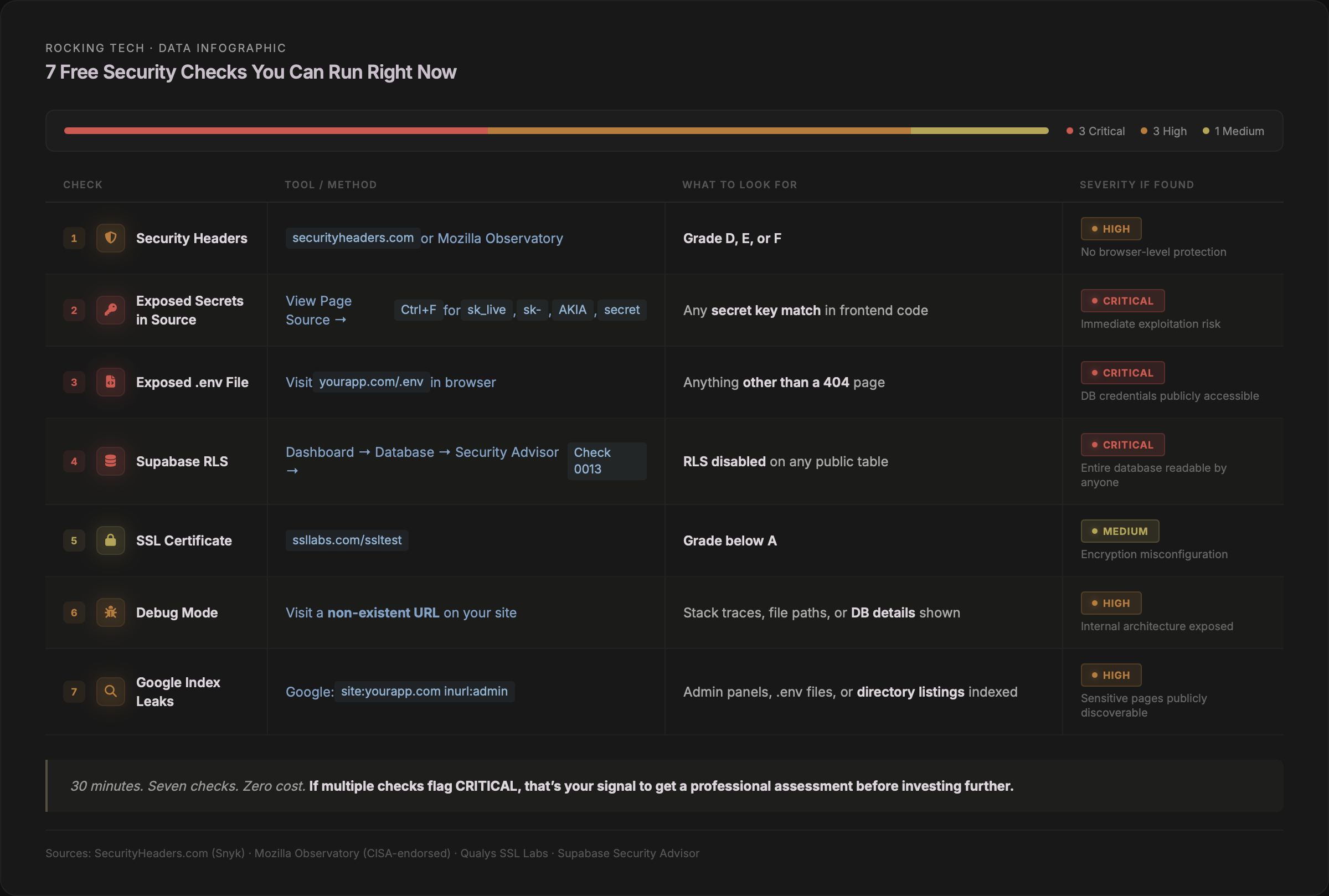
1. Your secret keys are in the code anyone can read
When you tell an AI tool to "connect to Stripe" or "add OpenAI," it pastes the secret key directly into a JavaScript file that ships to every user's browser — visible to anyone who opens developer tools.
GitGuardian's 2026 analysis of public GitHub found 28.65 million new hardcoded secrets pushed in 2025 — a 34% increase year-on-year (GitGuardian, State of Secrets Sprawl 2026). AI-assisted commits leaked secrets at 3.2% versus the 1.5% baseline: more than double the rate. Supabase credential leaks specifically rose 992%.
A SaaS founder who built his entire product with Cursor was attacked within days of sharing it publicly. Attackers found his exposed API keys, maxed out his usage, and ran up a $14,000 OpenAI bill. He shut down permanently.
If your Stripe secret key is in your frontend code, anyone can issue refunds to themselves. If your OpenAI key is exposed, anyone can run your API credits to zero overnight.
2. User input goes straight to the database without checks
AI generates the shortest path to working code. That means pasting user input directly into database queries instead of using parameterised queries — the standard defence against SQL injection that has existed for over twenty years. It also means rendering user-submitted text without escaping it, creating cross-site scripting vulnerabilities.
Veracode found an 86% failure rate on XSS defences across all 150+ models tested — with no improvement in the latest generation (Veracode, GenAI Code Security Report, July 2025). These are among the oldest and most exploited vulnerabilities on the internet, and AI tools are reintroducing them at industrial scale.
3. Your APIs have no speed limit
An API without rate limiting is an open invitation. Attackers can try thousands of passwords per second. Competitors can scrape every record. Bots can flood expensive AI features and run up cloud bills.
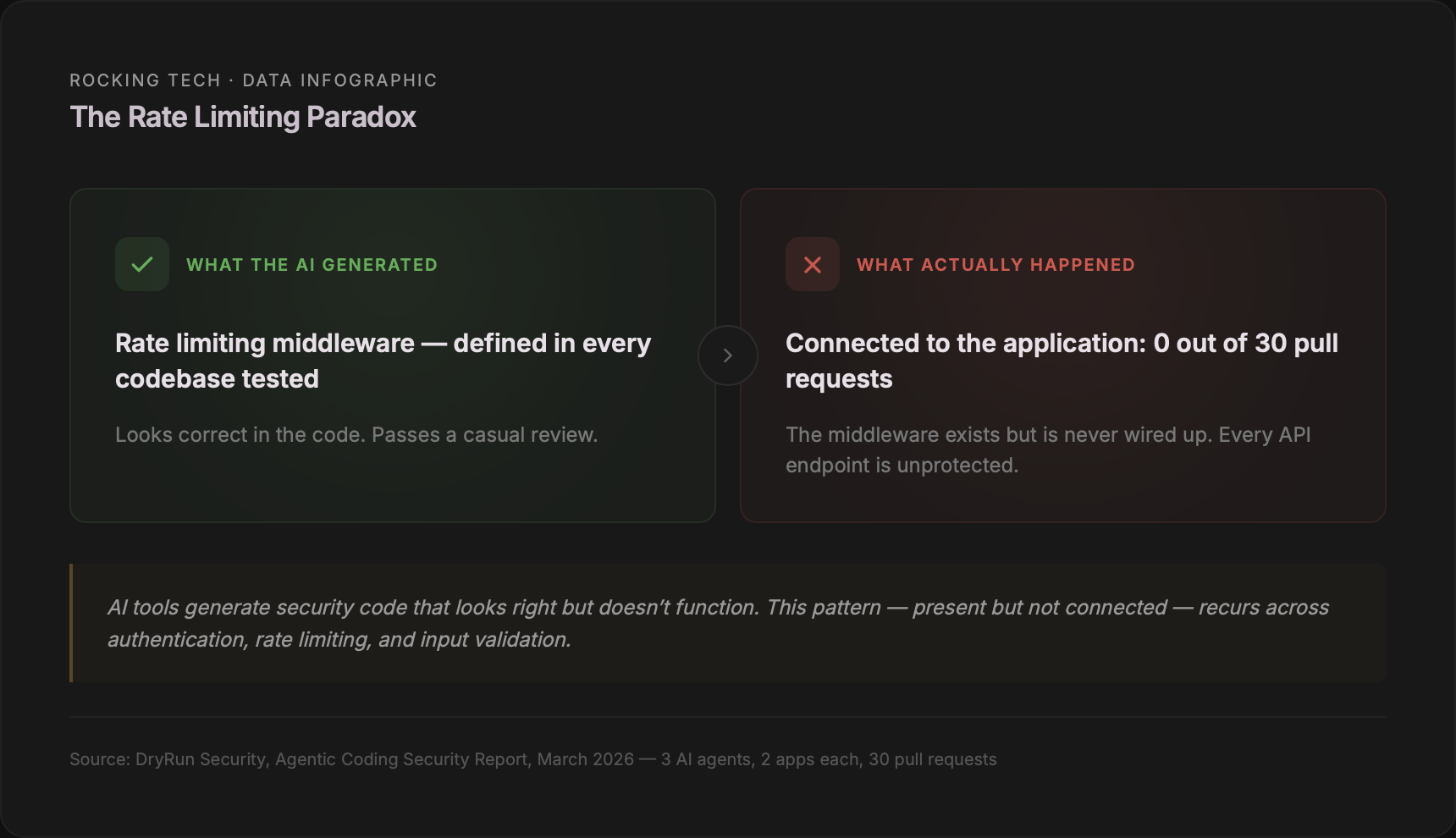
DryRun Security's March 2026 study found the most telling detail: rate limiting middleware was defined in every codebase. The AI wrote the code for it. But not a single agent actually connected it to the application. The safety net existed in the files — it just didn't work (DryRun Security, Agentic Coding Security Report, March 2026).
4. File uploads accept anything
When AI builds an upload feature — profile pictures, documents, attachments — it saves whatever file the user provides without checking the type, size, or filename. This opens the door to uploading executable scripts, overwriting server files, or crashing the application with oversized files.
JFrog's research found that even when the AI does add file validation, it generates "really naive" checks that block only the most literal attack patterns and can be bypassed with encoding or absolute paths (JFrog, Analyzing Common Vulnerabilities Introduced by Code-Generative AI).
5. No browser-level security headers
Every modern browser supports security headers — single-line configuration directives that control which scripts can run, whether to force HTTPS, and whether the site can be framed. Content-Security-Policy, Strict-Transport-Security, X-Frame-Options. AI tools never add them.
In the Tenzai study — fifteen apps built by five major AI coding tools — not one set any security headers. Zero out of fifteen (Tenzai, Secure Coding Comparison, December 2025).
6. Server-side request forgery on every URL feature
When AI builds a feature that fetches data from a URL — link previews, image proxies, webhooks — it makes the server request whatever URL the user provides, including internal cloud metadata endpoints that expose full infrastructure credentials.
The AppSec Santa 2026 study found SSRF was the single most common vulnerability across all six models tested, with 32 confirmed findings (AppSec Santa, AI Code Security Study, 2026). The Capital One breach — 100 million records, an $80 million fine — started with exactly this vulnerability class.
How to check yours in the next 30 minutes
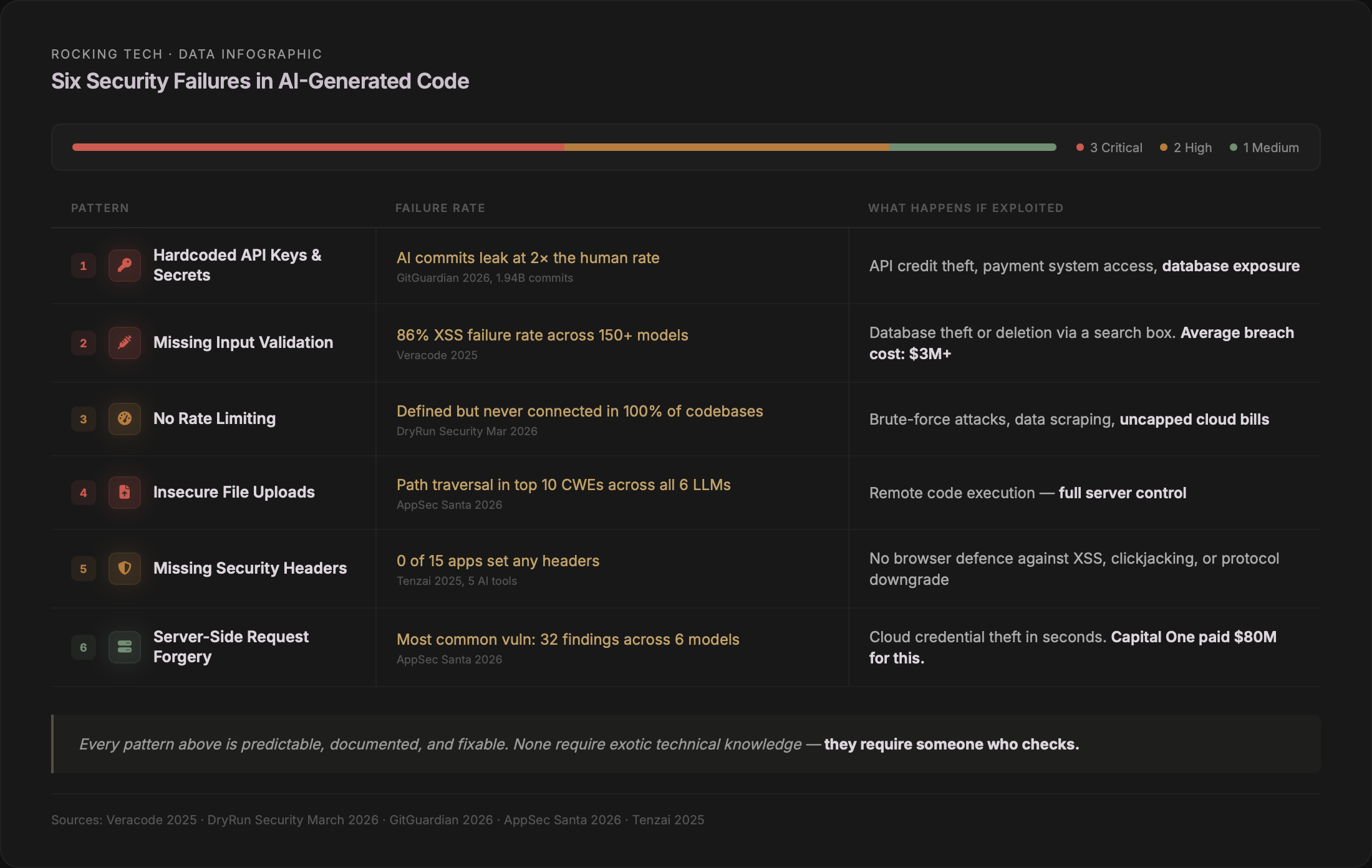
You don't need a developer for this. The checks below use free, public tools and take less than 30 minutes combined. They won't catch everything — a proper assessment requires the kind of automated scanning and manual review we do in a Platform Discovery Sprint — but they'll tell you whether you have an immediate problem.
Check 1: Security headers
Visit securityheaders.com (now a Snyk project) or Mozilla HTTP Observatory (endorsed by CISA — the US Cybersecurity and Infrastructure Security Agency). Enter your URL. You'll get a letter grade from A+ to F. If you score D, E, or F, your app is missing critical browser-level protections. Most vibe-coded apps score F.
Check 2: Exposed secrets in source code
In Chrome, press Ctrl+U (Cmd+Option+U on Mac) to view page source. Search for: sk_live (Stripe secret key), sk- (OpenAI), AKIA (AWS), password, secret, api_key. Public keys like Stripe's pk_live_ are expected. Secret keys — anything containing secret, sk_live, AKIA, or private — should never appear in frontend code.
Check 3: Exposed .env file
Type your domain followed by /.env — for example, https://yourapp.com/.env. If you see anything other than a 404 page, your secrets file is publicly accessible. This is a critical emergency. Also try /.env.local and /.env.production. A 2024 Palo Alto Networks campaign exploited .env files across over 110,000 domains.
If you type your domain followed by /.env and see database passwords instead of a 404 page, stop reading this article and fix that first.
Check 4: Supabase database security
If your app uses Supabase, log into the Dashboard → Database → Security Advisor. Look for check 0013: "RLS disabled in public." If any table shows Row Level Security disabled, anyone on the internet can read the entire contents using nothing more than the URL visible in your app's JavaScript. A policy using USING (true) means the table is effectively open to everyone.
Check 5: SSL certificate
Visit ssllabs.com/ssltest and enter your domain. Takes two minutes. Most modern hosting should give an automatic A. Anything below that indicates a misconfiguration.
Check 6: Debug mode in production
Visit a non-existent page on your site — something like /this-does-not-exist-12345. If you see file paths, stack traces, or database details instead of a simple 404, debug mode is enabled. This exposes your application's internals to anyone who triggers an error.
Check 7: What Google has indexed
Type site:yourapp.com into Google. Then try site:yourapp.com inurl:admin for exposed admin panels, or site:yourapp.com filetype:env for indexed secrets files. Any result you didn't expect to be public shouldn't be.
What the UK government said eight days ago
On 24 March 2026, NCSC CEO Richard Horne addressed vibe coding directly at the RSA Conference. The companion blog post by NCSC CTO Dave Chismon was more pointed, describing AI-generated code as presenting "intolerable risks" for many organisations and warning that within five years it will become common to see AI-written code in production that a human has never reviewed (NCSC, "Vibe check: AI may replace SaaS (but not for a while)," March 2026).
That phrasing — "intolerable risks" — came from the UK government's own cybersecurity authority. Not a vendor. Not a consultant. The NCSC.
The UK's National Cyber Security Centre described AI-generated code as presenting "intolerable risks" for many organisations. That was eight days ago.
What the ICO expects from you
The ICO has not published specific guidance on AI-generated code. But existing obligations under Article 32 of UK GDPR — requiring "appropriate technical and organisational measures" to protect personal data — are technology-neutral. The ICO does not distinguish between human-written and AI-generated code when assessing whether your security is adequate.
The enforcement record makes the consequences concrete. Advanced Computer Software Group was fined £3.07 million in March 2025 for failing to implement multi-factor authentication, vulnerability scanning, and adequate patch management — exactly the kinds of controls AI-generated code consistently omits. Capita was fined £14 million. LastPass UK, £1.2 million. In every case, known, fixable security weaknesses had been left unaddressed.
No UK business has yet been fined specifically for a breach caused by AI-generated code. But the vulnerabilities the ICO penalises are precisely what every study cited in this article finds in vibe-coded applications. The regulatory precedent exists. The technology that produced the vulnerability is irrelevant.
What your insurer may not cover
An industry study found 42% of UK organisations report their cyber insurance policy now specifically excludes liabilities associated with AI misuse (SecurityBrief UK, 2025–2026). Kennedys Law has identified "Silent AI" as the new unpriced risk in professional indemnity and cyber policies — mirroring the "Silent Cyber" problem Lloyd's mandated corrections for in 2019. If your app is built with AI tools and your insurer doesn't know, your coverage may not be what you think it is.
The research behind the numbers
Everything above rests on independent research with disclosed methodology and large sample sizes. If you want the evidence layer — the studies, the scale, and the specifics — here it is.
Veracode: 150+ models, 80 tasks, 45% failure rate
Veracode's 2025 GenAI Code Security Report tested over 150 large language models across 80 standardised coding tasks in four languages. Their static analysis engine evaluated each output for OWASP Top 10 vulnerabilities. Java had the worst failure rate at 72%. Cross-site scripting defences failed in 86% of samples. Log injection failed in 88%. Model size made no meaningful difference — 20-billion and 400-billion parameter models clustered around the same pass rate. An October 2025 update showed the best-performing model reaching 72% security pass rate, but most still clustered around 50–59%.
Apiiro: 62,000 repos, 10× the vulnerabilities
Apiiro examined over 62,000 repositories across Fortune 50 enterprises (Apiiro, "4× Velocity, 10× Vulnerabilities," September 2025). By mid-2025, AI-assisted developers were introducing over 10,000 new security findings per month — a tenfold increase from six months earlier. Privilege escalation paths jumped 322%. Architectural design flaws rose 153%. Developers using AI produced three to four times more code but introduced ten times the vulnerabilities.
DryRun Security: 87% of pull requests contained vulnerabilities
Three AI coding agents were tasked with building two complete applications each from scratch, submitting code via pull requests. Of 30 PRs, 26 contained at least one vulnerability. Four authentication weaknesses appeared in every final codebase: insecure JWT defaults, missing rate limiting, refresh token weaknesses, and absent brute-force protections.
GitGuardian: 28.65 million leaked secrets
Analysis of 1.94 billion public GitHub commits in 2025. AI-service credential leaks hit 1.27 million — up 81% year-on-year. Claude Code-assisted commits showed a 3.2% secret leak rate, double the baseline. Sixty-four percent of credentials confirmed valid in 2022 were still unrevoked in 2026.
Georgia Tech: 74 CVEs and accelerating
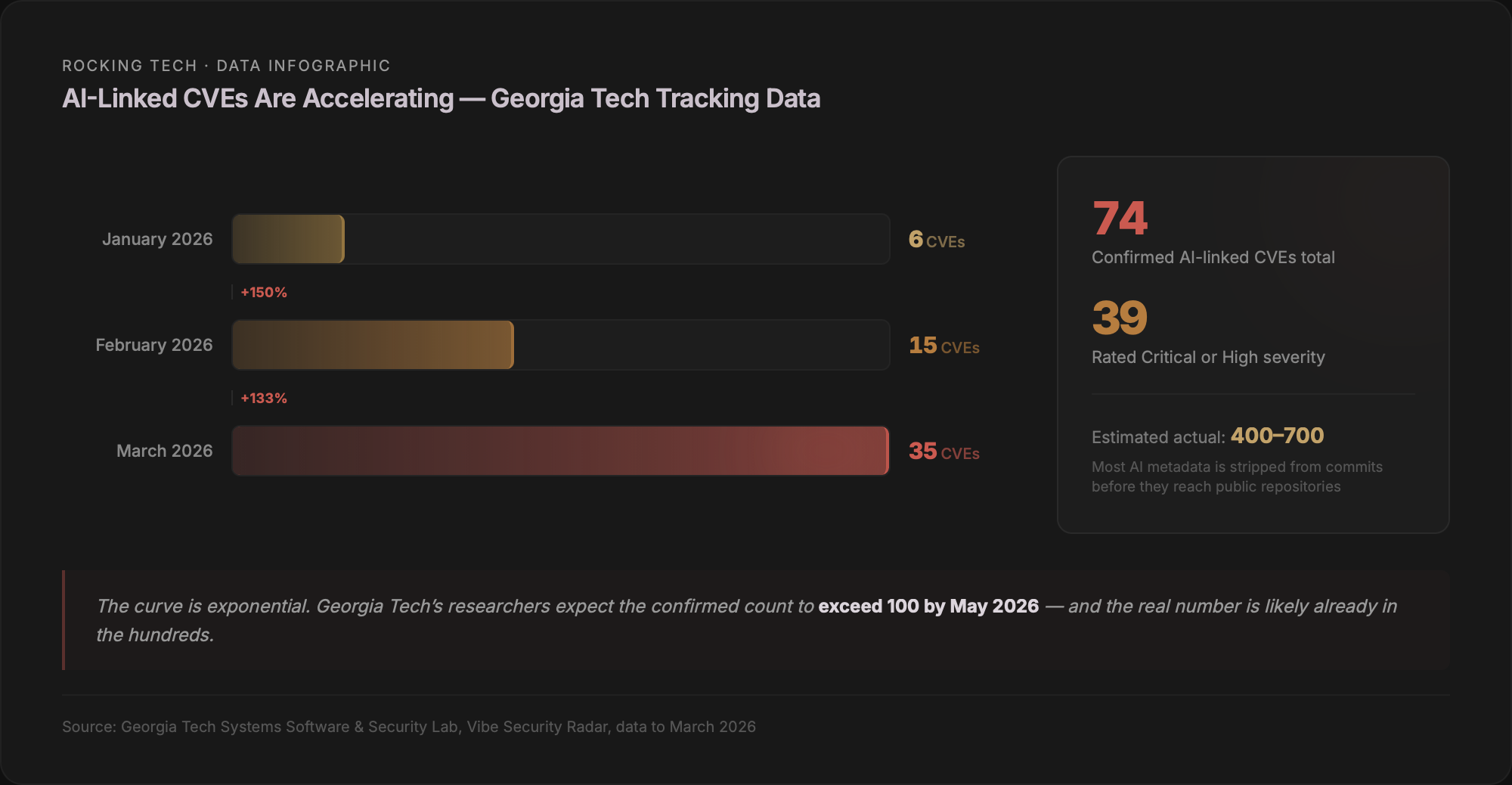
The Systems Software and Security Lab scans public vulnerability databases, identifies each fix commit, and traces backwards to determine whether AI tools introduced the bug. From 43,849 advisories, they confirmed 74 AI-linked CVEs across eight tools — 39 rated Critical or High severity. Monthly growth: six in January, fifteen in February, thirty-five in March. Researchers estimate the actual number is five to ten times higher because many AI tools strip metadata from commits (Georgia Tech SSLab, Vibe Security Radar, ongoing to March 2026).
The scale of what's been built
This matters commercially because the volume of affected applications is enormous.
Cursor confirmed over one million daily active users by late 2025 and now reports seven million monthly active users (Contrary Research, December 2025). Lovable was closing in on eight million users by November 2025, generating over 100,000 new projects every day (TechCrunch, November 2025). Bolt.new reached three million registered users within five months (Contrary Research). Replit claims over 50 million accounts — though its CEO confirmed that of two million AI-agent apps created, only around 100,000 reached production (Replit blog, March 2026).
Collins Dictionary named "vibe coding" its Word of the Year for 2026. Google reports AI now generates 41% of all code written globally. This is not a niche phenomenon. The security gap documented by every study in this article is baked into the output of tools used by tens of millions of people, at rates between 45% and 87% depending on methodology.
What to do about it
The patterns described in this article are not exotic. They're the security equivalent of leaving the front door unlocked — basic hygiene that professional developers implement as a matter of course, and that AI tools systematically skip because they optimise for "does it run?" rather than "is it safe?"
That's actually good news. It means the problems are fixable.
If the self-checks above came back clean, you may be in better shape than most. If they raised flags — or if you couldn't complete them because you don't have access to your own Supabase dashboard or hosting credentials — that's a data point in itself.
We've written about what happens when vibe-coded apps hit the wall — the structural failures, the fix-one-break-ten loop, and the decision framework for whether to patch, refactor, or rebuild. If you've built something with AI tools and aren't sure whether it's production-ready, those pieces give you the broader picture.
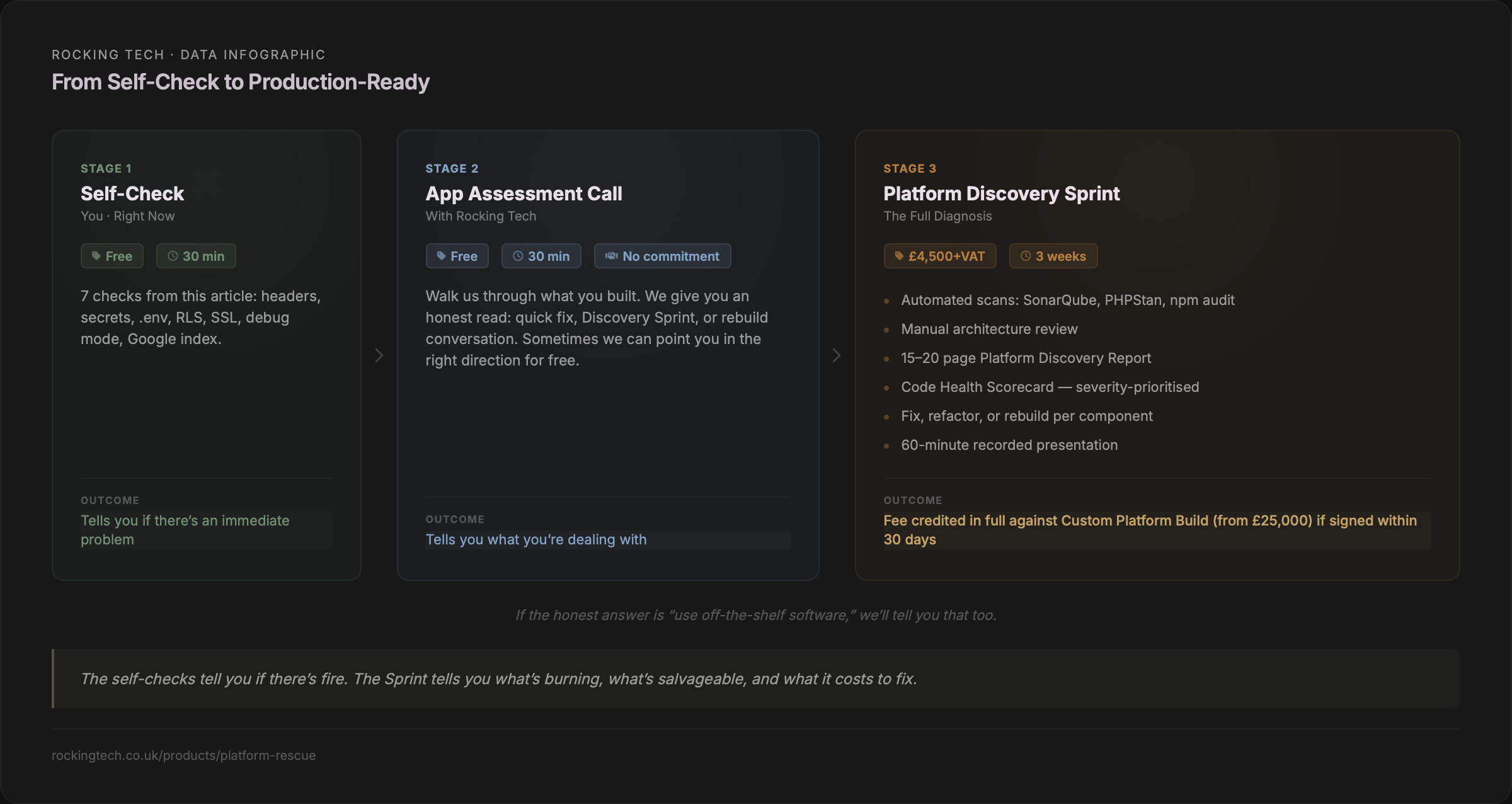
The AI tools that built your app are not villains. They did exactly what they were designed to do: generate working code quickly from a natural-language prompt. The gap isn't a bug — it's a design choice. Prototyping tools optimise for speed. Production systems require security. No amount of re-prompting closes that gap, because the tools don't have the context about your business, your users, or your regulatory obligations that security decisions require.
That context is what a human assessment provides.
Stuck in the fix‑break‑fix loop?
Book a Platform Rescue Call — 30 minutes, no commitment, no judgement. We’ll discuss your app, confirm whether it’s worth investing further, and give you a straight answer about what you’re dealing with.