· 16 min read
How to Audit a Laravel Codebase You've Inherited
You've just inherited a Laravel application you didn't build. Before you change a single line of code — or pay someone else to — you need to know exactly what you're working with. This is the audit process, step by step, for both technical leads and non-technical business owners.

Anatoly Silko
Founder, Rocking Tech
Most businesses don't inherit a Laravel codebase on purpose. A developer leaves. An agency relationship ends. A company is acquired. A freelancer goes quiet. However it happens, the result is the same: you now own a working application, built by someone you may never speak to again, with no clear picture of what's inside it.
This is not unusual. Digital agencies experience average client churn rates of 42% annually for project-based work and 18% for retainer relationships, with an average client lifespan of just 24 months for project-based engagements (Focus Digital, Agency Churn Report 2025). Separately, 81% of UK businesses report being negatively affected by IT and tech skills shortages (Hyve Managed Hosting, IT & Tech Skills Gap Report 2024). The inherited codebase scenario isn't an edge case — it's the default outcome of a market where developer tenure, agency relationships, and project continuity rarely align.
The question you're facing isn't whether to audit. It's how to audit properly — distinguishing genuine risks from cosmetic noise, and understanding what the tools are actually telling you.
This article covers both sides. If you're a technical lead, it walks through the audit toolkit, what each tool finds and misses, and what "good" looks like in concrete benchmarks. If you're a managing director or founder who can't read PHP, it gives you a non-technical checklist you can run yourself before commissioning a professional review — and a framework for interpreting what the professionals report back.
The companion articles in this series cover what happens when your developer leaves, what happens when nobody applies security updates, the warning signs that your application has become a liability, and how much it costs to rescue a neglected codebase. This article is about the audit itself — the process, the tools, the interpretation.
Start with what you can check without opening the code
If you're a non-technical business owner, you don't need to wait for a developer to tell you whether you have a problem. There are things you can verify right now, today, that cost nothing and take less than an hour.
Do you own the domain? UK domains (.co.uk and .uk) are managed by Nominet, and you can verify ownership through a WHOIS lookup in minutes. The risk is real: domains are routinely registered by agencies or developers using their own details rather than the client's. If a dispute arises, Nominet's resolution process takes roughly ten weeks and costs £200–£750+VAT. Since 2001, over 16,000 domain disputes have been resolved through this process, and the vast majority result in transfer to the complainant (Nominet DRS). But prevention is considerably cheaper than dispute resolution.
Do you have access to the Git repository? The codebase should live in a version control system — GitHub, GitLab, or Bitbucket — and the account should belong to your company, not to a departed individual. If you can't access the repository, you can't see the history of changes, you can't grant access to a new developer, and you don't truly control the code.
Do you have server and hosting credentials? Can you log into the hosting dashboard? Do you know who controls the SSL certificate? Are third-party service accounts — Stripe, Mailgun, AWS, whatever the application uses — registered under company email addresses or someone's personal account?
When was the last deployment? If nobody can tell you when the application was last updated, that's a data point in itself. An application that hasn't been deployed in six months is accumulating unpatched vulnerabilities at a predictable rate — we covered the specific CVE timelines and exploitation data in Laravel Security: What Happens When Nobody's Applying Updates.
Are backups running? Not "do backups exist" — when was the last verified restore? A backup that has never been tested is a hypothesis, not a safety net.
Is there any documentation? A README file, deployment instructions, architecture diagrams — anything. 78% of developers joining a new project find navigating an unfamiliar codebase challenging or very challenging (JetBrains Platform Blog, March 2026). Documentation problems typically consume 15–25% of engineering capacity (DX/GetDX). If no documentation exists, the first developer you hire will spend their initial weeks (and your money) figuring out what the previous developer already knew.
None of these checks require technical skill. All of them tell you something material about the state of the asset you've inherited. If the answers to several of these are "no" or "I don't know," you have the answer to whether a professional audit is worth commissioning.
An application that hasn't been deployed in six months is accumulating unpatched vulnerabilities at a predictable rate. A backup that has never been tested is a hypothesis, not a safety net.
The audit toolkit: what each tool actually finds — and what it misses
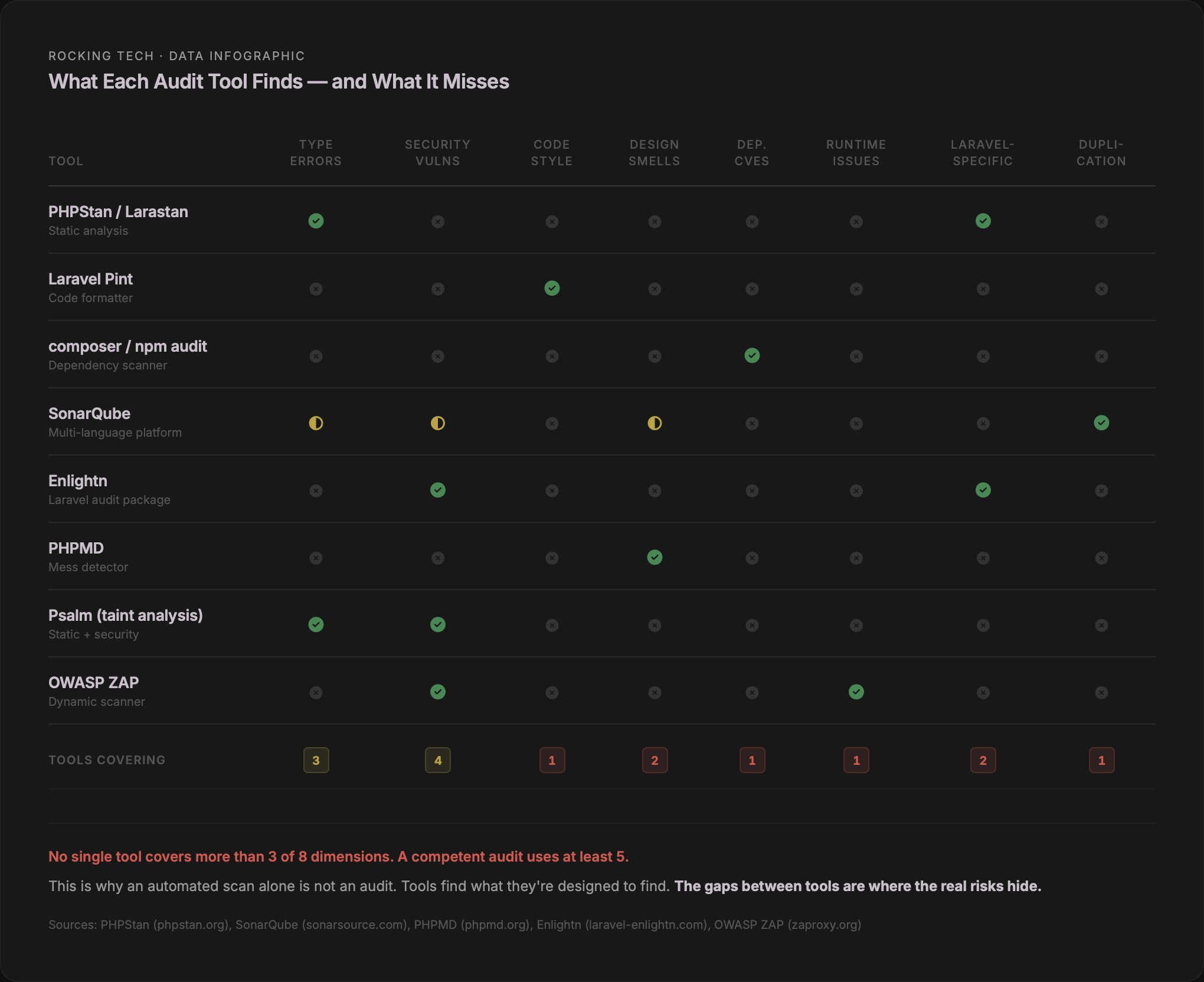
A competent Laravel audit uses multiple tools because no single tool covers everything. Each instrument examines one dimension of code health. Understanding what each tool does — and does not — check is the difference between reading audit findings intelligently and being overwhelmed by a wall of numbers.
Static analysis: PHPStan and Larastan
PHPStan analyses your code without running it, looking for type errors, undefined methods, unreachable code, and argument mismatches. It operates on a scale of levels 0 to 9, each progressively stricter:
Levels 0–2 catch the basics: unknown classes, wrong argument counts, possibly undefined variables. Level 3 adds return type checking. Level 5 adds argument type validation. Level 6 flags missing type hints. Levels 8 and 9 enforce strict nullability and mixed-type safety.
Larastan extends PHPStan specifically for Laravel, resolving the "magic" that makes Laravel powerful but also makes static analysis difficult — Eloquent models, Facades, the service container, query builders, and collection methods all get proper type inference.
The practical reality: error counts typically double between level 5 and level 8 on the same codebase (Tomas Votruba, phpstan-bodyscan). The default Larastan configuration starts at level 5. No published data exists on what percentage of production codebases pass level 5 or above, but anecdotally, most inherited applications start at level 0 and work upward. Introducing PHPStan at level 8 on a payment processing system reportedly caught errors that would have caused production incidents (fsck.sh).
What it does not check: design smells, code style, security vulnerabilities, or runtime behaviour. PHPStan tells you whether the code is technically correct. It does not tell you whether it's well-designed.
Code style: Laravel Pint
Laravel Pint, included by default in every new Laravel application since version 9.21, enforces consistent formatting based on PHP-CS-Fixer. It auto-fixes issues — brace placement, array syntax, concatenation spacing, namespace imports, type declarations — rather than merely reporting them.
Style matters beyond aesthetics. A study analysing 2.2 million lines of code found that better readability correlates directly with fewer defects (Axify). Separate research across 54 open-source projects and 112,266 commits found a positive quality effect when code analysis tooling was present (Empirical Software Engineering, Springer). The mechanism is straightforward: inconsistent formatting makes code harder to read, harder reading increases the probability of missed bugs during review, and missed bugs compound into production issues.
What it does not check: bugs, types, security, or logic errors. Pint ensures the code is consistently formatted. It says nothing about whether it works.
Dependency scanning: composer audit and npm audit
composer audit, built into Composer since version 2.4, checks your PHP dependencies against the Packagist Security Advisory database. Since Composer 2.7, it also flags abandoned packages — projects whose maintainers have walked away.
The PHP ecosystem context: 80% of application dependencies remain un-upgraded for over a year (Sonatype, 10th Annual State of the Software Supply Chain, 2024). Yet 95% of the time a vulnerable component is consumed, a fixed version already exists. The gap between "a patch is available" and "the patch is applied" is where most of the real-world risk lives.
On the frontend side, npm audit checks JavaScript dependencies against the GitHub Advisory Database. The npm ecosystem faces a more acute threat: over 99% of identified open-source malware appeared on npm in 2025, with 454,600 new malicious packages identified in that year alone (Sonatype, 2026 Supply Chain Report). The cumulative total now exceeds 1.2 million known-malicious packages across all ecosystems.
What neither tool checks: source code vulnerabilities, logical bugs, misconfigurations, or zero-day exploits. They catch known problems in known packages. They do not examine your custom code.
Comprehensive scanning: SonarQube
SonarQube's Community Edition covers PHP 5.0 through 8.4, including Laravel and Symfony, with over 270 built-in static analysis rules. It produces metrics across six dimensions: bugs, vulnerabilities, code smells, security hotspots, test coverage (imported from external reports), and code duplication.
SonarQube's default quality gate for new code requires zero new bugs, zero new vulnerabilities, all security hotspots reviewed, code coverage of 80% or above on new code, and duplication of 3% or less on new code (SonarQube documentation). The tool's own documentation targets zero false positives for bugs, and over 80% true positives for vulnerability detection.
What it does not check: runtime behaviour, infrastructure configuration, or Laravel-specific patterns.
Laravel-specific auditing: Enlightn
Enlightn is the only tool built specifically for auditing Laravel applications. The open-source version runs 66–67 automated checks; the Pro version runs 131. Checks span three categories — performance, security, and reliability — and cover Laravel-specific concerns that generic tools miss: route and config caching, N+1 queries, middleware bloat, CSRF configuration, cookie security, mass assignment exposure, queue configuration, and environment validation.
What it does not check: general PHP issues outside Laravel-specific patterns.
Design quality: PHPMD
PHP Mess Detector examines dimensions that PHPStan deliberately ignores: cyclomatic complexity, NPath complexity, coupling between objects, excessive method and class length, naming conventions, unused code, depth of inheritance. Its default cyclomatic complexity threshold is 10 — the upper limit Thomas McCabe proposed in his original 1976 paper, and the threshold still endorsed by the Software Engineering Institute at Carnegie Mellon.
What it does not check: type correctness, security vulnerabilities, or formatting.
Automated refactoring: Rector
Rector parses PHP into an abstract syntax tree, applies transformation rules, and regenerates the modified code. With 824 total rules and a dedicated rector-laravel package providing 100+ Laravel-specific transformations, it can automate version upgrades, modernise deprecated patterns, and enforce consistency. One UK-based Official Laravel Partner reports that 20–40 hours of manual upgrade work for a medium application can be partially automated by Rector in minutes.
The critical caveat: Rector transforms code — it does not verify semantic correctness. Without a test suite, automated refactoring can introduce bugs silently. It is a power tool, not a safety net.
What's missing from the list above
A thorough audit also uses Psalm (Vimeo's static analyser, which adds taint analysis for SQL injection and XSS detection that PHPStan lacks natively), PHPCPD (copy-paste detection for identifying duplicated code blocks), Deptrac (enforcing architectural boundaries so layers don't violate dependency rules), and OWASP ZAP for dynamic application security testing against the running application — finding runtime vulnerabilities that no static tool can see.
What "good" actually looks like: benchmarks for a healthy codebase
Audit tools produce numbers. Without benchmarks, those numbers are meaningless. Here's what the published data says about where the lines fall.
Test coverage
Martin Fowler's widely-cited guidance: aim for the upper 80s to 90%, and be suspicious of anything claiming 100%. Google's internal research, published at ESEC/FSE 2019, is more granular: 60% is acceptable, 75% is commendable, 90% is exemplary. SonarQube's default quality gate requires 80% coverage on new code. The Laravel framework itself maintains approximately 76% line coverage, with heavily-used core classes (Query Builder, Router) above 90%.
The JetBrains State of Developer Ecosystem survey found that 31% of PHP developers don't write tests at all. For a custom business application built by a solo developer or small agency, finding zero test coverage is common. Finding 40–60% coverage is respectable. Finding 80%+ is genuinely good.
Google's testing blog puts it plainly: the gains of increasing coverage beyond a certain point are logarithmic, but taking concrete steps to move from 30% to 70% is where the real value lies. If you've inherited a codebase at 0%, the goal isn't 90%. The goal is getting critical paths — authentication, payments, data mutations — covered first.
Code duplication
SonarQube's default threshold: 3% or less duplicated lines on new code. Industry guidance is more forgiving for legacy codebases: below 5% is considered optimal, 5–10% is acceptable, and above 10% requires immediate attention (KPI Depot). For codebases inheriting AI-generated code, SonarSource's own recommendation tightens to 1% or less.
Cyclomatic complexity
McCabe's original 1976 recommendation — a method-level upper limit of 10 — remains the industry standard. The Software Engineering Institute at Carnegie Mellon classifies 1–10 as simple and low risk, 11–20 as moderate, 21–50 as complex and high risk, and above 50 as effectively untestable. PHPMD uses 10 as its default threshold.
In practice, an inherited Laravel codebase will contain methods above 10. The question is where. High complexity in a controller action that handles payment processing is a red flag. High complexity in a one-off data migration script is not.
Dependency freshness
80% of application dependencies remain un-upgraded for over a year (Sonatype, 2024). Expecting 100% of dependencies to be current at all times is unrealistic. A well-managed application should aim to be no more than one minor version behind on critical dependencies, with a regular cadence (monthly or quarterly) for reviewing and updating.
Red flags, amber flags, and cosmetic noise
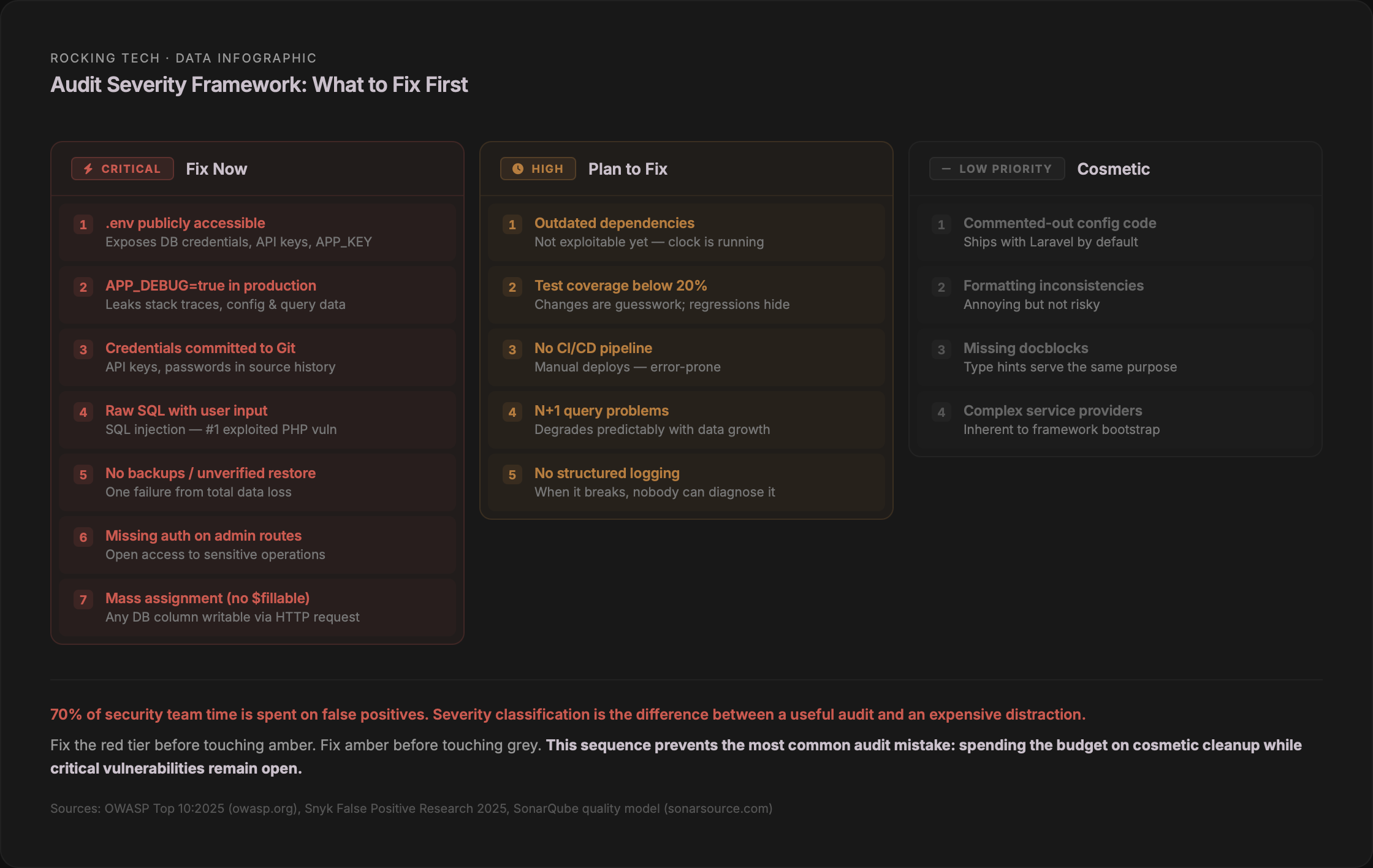
Not everything an automated tool flags matters equally. The most important skill in reading audit results is severity classification — distinguishing the findings that demand immediate action from the ones that can wait, and both of those from the noise that looks alarming but affects nothing.
Red flags: immediate risk
These warrant action before anything else. They represent security exposure, data loss risk, or production instability.
A .env file accessible from a browser — containing database credentials, API keys, and the application's encryption key. APP_DEBUG set to true in production — exposing full stack traces, environment variables, and database queries to any user who triggers an error. Hardcoded credentials committed to the Git repository. SQL queries built with raw string concatenation of user input. Admin routes without authentication middleware. No backups, or no verified restore capability. Eloquent models without $fillable or $guarded properties — leaving every database column open to mass assignment. Missing CSRF protection on forms. Missing database constraints where the application logic assumes uniqueness or referential integrity.
An audit that documented a real inherited Laravel codebase found forms susceptible to CSRF attacks, PSR standardisation gaps, missing namespaces, classes with thousands of lines, over 30 switch statements indicating missing polymorphism, and no dependency injection — all in a single 24-page report (Zaengle Corp).
Amber flags: technical debt, not immediate danger
Outdated but still-supported dependencies. Low test coverage (below 20%). Inconsistent code style and naming conventions. No CI/CD pipeline — manual deployments. No structured logging. N+1 query problems. Oversized classes and methods. TODO comments without corresponding backlog items.
These won't cause a production incident tomorrow. They will cause the next developer to move slowly, make mistakes, and cost you more than they should.
Cosmetic findings: ignore these first
Commented-out code in Laravel config files — these ship with the framework by default. PSR formatting violations in non-public code. Missing docblocks on methods that already have full type hints (Spatie's own guidelines explicitly say not to add them). Minor complexity warnings on service providers or configuration classes that are inherently complex by nature.
This matters because alert fatigue is real and documented. 70% of a security team's time is spent investigating false positive alerts. 33% of companies have been late responding to actual cyberattacks because teams were occupied with false positives. Each false positive takes an average of 32 minutes to investigate (Snyk, 2025). If you let the noise drown out the signal, you will spend your audit budget on cosmetic fixes while the .env file remains publicly accessible.
What a competent professional audit actually covers
If the non-technical checklist and the automated tools are the first two layers, the professional expert review is the third — and the most valuable. An experienced Laravel auditor doesn't just run the tools listed above. They interpret the results in context, examine dimensions that tools cannot see, and produce a prioritised assessment that tells you what to do, in what order, and why.
The most comprehensive published Laravel audit methodology, from a US-based Official Laravel Partner (Ravenna Interactive), covers seven core categories: architecture and boundaries (where business rules live, duplicated logic, tight coupling, "god objects"); security (authorisation correctness, multi-tenant isolation, sensitive data handling); data integrity and concurrency (missing database constraints, risky read-then-write sequences, non-idempotent payment handlers); performance and scalability (N+1 queries, indexing strategy, synchronous work in HTTP requests, queue design); test strategy and change safety (coverage of risky paths — billing, permissions, state transitions); dependency and supply-chain risk (outdated packages, known CVEs, pinning strategy, version lifecycle); and deployment, runtime, and observability (environment parity, rollback plans, migration safety, logging quality, queue monitoring).
The OWASP Top 10 maps specifically to Laravel in ways worth understanding. Laravel's defaults are strong against injection (Eloquent uses PDO parameter binding), XSS (Blade's {{ }} auto-escapes by default), CSRF (middleware enabled by default), and cryptographic failures (built-in bcrypt/Argon2 hashing). But Laravel requires explicit developer action for broken access control (Gates and Policies exist but are not enforced unless applied), security misconfiguration (APP_DEBUG=true ships as the default), supply chain failures (no built-in dependency vulnerability scanning), insecure design (no framework can fix missing threat modelling), and logging and alerting (Monolog is included but minimally configured). The top three OWASP categories are, in the words of a specialist Laravel security auditor, "common weaknesses I find when auditing Laravel apps" (Stephen Rees-Carter, Securing Laravel).
A US-based Laravel specialist who has completed hundreds of security reviews describes their process as: code review for vulnerabilities first, then a knowledge-applied penetration test using the code review findings, followed by common area checks, with continuous dialogue throughout. They explicitly note that a code review is not a penetration test — these are distinct services that complement each other.
How long it takes and what it costs
For a typical Laravel application — 50 to 200 models, 10,000 to 50,000 lines of code — the published consensus across multiple agency sources is two to three weeks for a comprehensive audit, broken down roughly as: onboarding and orientation (days 1–2), automated scans plus initial manual review (days 3–7), deep dives into architecture, security, and performance (days 8–12), and report writing with prioritised recommendations (days 13–15).
The automated scan alone — running PHPStan, Enlightn, SonarQube, composer audit, npm audit, and PHPMD — takes hours, not days. What takes the remaining time is the expert interpretation: triaging false positives, assessing business impact, evaluating architectural decisions in context, and producing a report that a non-technical stakeholder can act on.
Globally, only three firms publish exact pricing for Laravel audit services. A US-based specialist offers video walkthroughs at $2,500 and written reports at $3,500, with 3–5 business day turnaround. A dedicated Laravel security reviewer charges a flat $2,500 regardless of application size. A vibe-code audit firm offers free initial assessments with full transformations at $10,000–$20,000. No UK agency publishes a fixed price for a Laravel code audit. Every UK firm reviewed — including Official and Platinum Laravel Partners in Birmingham, Southampton, and Edinburgh — requires a consultation before quoting.
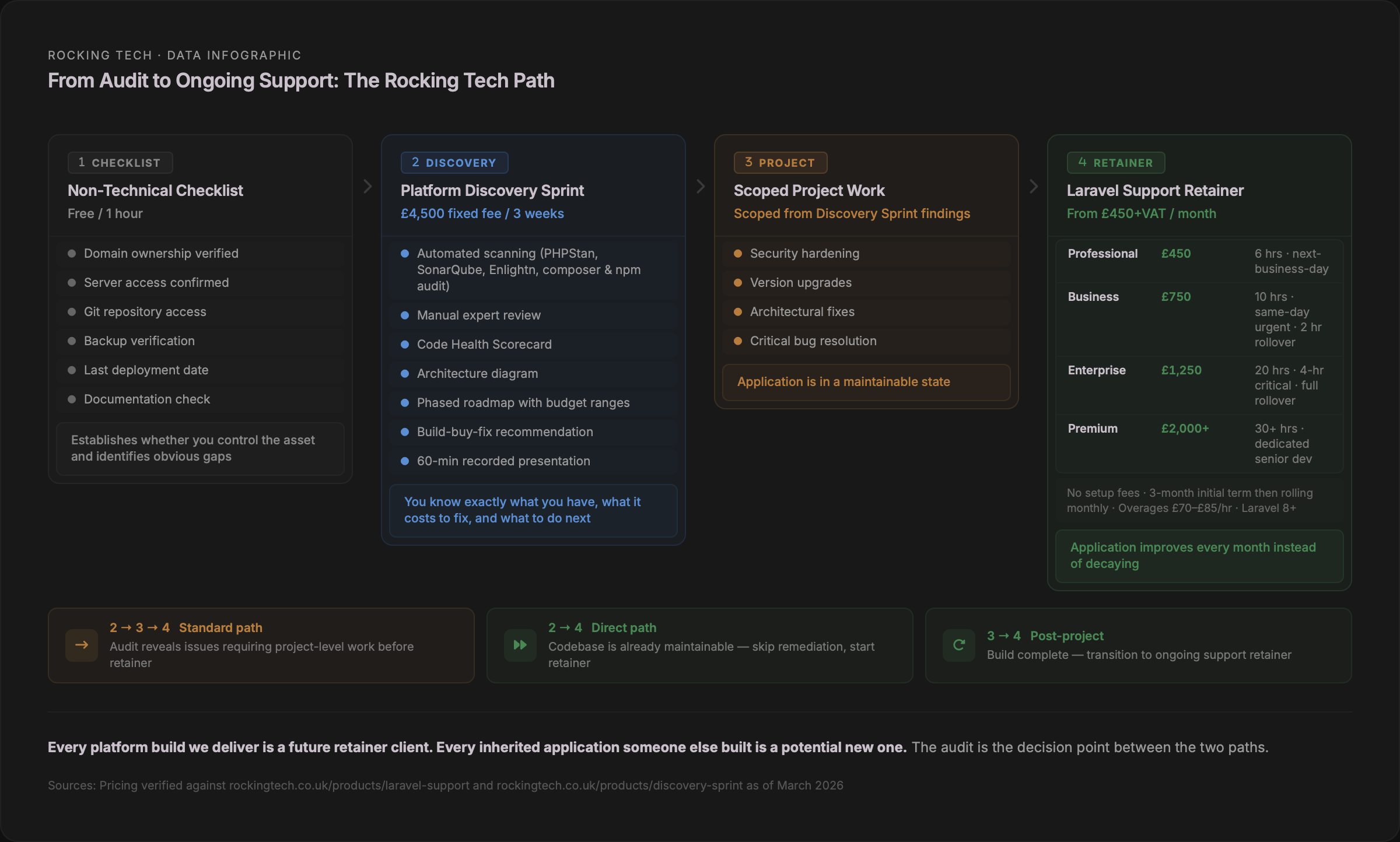
The UK market gap for a productised, transparently-priced Laravel audit with defined deliverables is significant. Our Platform Discovery Sprint at £4,500 was designed in part to fill this gap — a fixed-fee, three-week engagement that produces a technical assessment, architecture diagram, phased roadmap with budget ranges, and a Code Health Scorecard for inherited applications. The companion article How Much Does It Cost to Rescue a Neglected Laravel Codebase? covers the full cost spectrum from assessment through to rebuild.
The documentation gap: what should exist but usually doesn't
Taylor Otwell, Laravel's creator, made an observation on the Maintainable.fm podcast in 2025 that frames the documentation problem precisely: "The Laravel apps that age best are the ones that don't get too clever — because the clever dev always moves on." He called "cleverness" a code smell and warned against what he described as "cathedrals of complexity."
Laravel's convention-over-configuration design is supposed to help here. When developers follow the framework's conventions — default folder structure, Eloquent patterns, standard routing — an inherited codebase is significantly easier to understand because the next developer knows where things should be. Christoph Rumpel, who runs the State of Laravel survey, made the point directly in March 2026: "Laravel's opinionated nature — the thing some people used to criticise — turns out to be its biggest strength." Jason McCreary, creator of Laravel Shift, has upgraded over 20,000 Laravel applications and consistently advises: "Keep the default folder structure." He reports that developers who create custom folder structures "eventually regretted it."
But convention-over-configuration only helps when conventions are followed. When they're not — custom folder structures, raw SQL bypassing Eloquent, unnecessary abstraction layers, "clever" patterns that deviate from framework idioms — the inherited codebase becomes harder to understand than a non-framework application, because the next developer expects conventions and instead finds deviations.
The documentation that should exist for any custom business application:
A README with setup instructions and architecture overview. Deployment procedures — not "deploy to production" but the actual commands, in order, with environment variables documented. Architecture diagrams at minimum covering context and container levels. An explanation of business logic decisions — the "why," not just the "what." A record of all credentials, API keys, and third-party service accounts. Known technical debt and architectural risks. Known bugs and workarounds.
In practice, most inherited codebases have none of this. Only 58% of organisations actively maintain documentation, while 73% of developers cite poor or incomplete documentation as their primary obstacle when working with existing code (Augment Code). The 15-percentage-point gap between how many organisations think they have adequate documentation and how many developers agree is, in itself, a finding.
When we onboard a new retainer client — and most of our retainer clients have applications built by someone else — the first thing we do is a 2–4 hour onboarding review using hours from their first month. We review the codebase, identify risks, and document what we find. That documentation then becomes the foundation for ongoing maintenance, and it grows with every month of service. Progressive documentation isn't a bonus feature; it's how responsible maintenance works.
The audit as a decision point
An audit is not maintenance. It is a one-time assessment that produces a decision: what to fix, in what order, and whether ongoing maintenance makes sense or whether more fundamental work is needed first.
The severity framework above gives you the prioritisation logic. Red flags get fixed before amber. Amber before grey. If your audit reveals that the codebase needs significant work — a major version upgrade, architectural restructuring, security hardening — that's a separate project, not a retainer. Trying to fix fundamental problems within a maintenance budget is how retainer relationships fail.
Once the critical issues are resolved and the application is in a maintainable state, the economics shift entirely. The comparison between ongoing neglect and structured maintenance is covered in detail in How Much Does It Cost to Rescue a Neglected Laravel Codebase?, but the headline figure bears repeating: a maintenance retainer at £450 per month costs £5,400 per year. That is less than a single average cyber breach for a UK SME, a fraction of a single emergency remediation project, and roughly one-fiftieth of a full rebuild.
What to do next
If you've read this far, you're in one of two positions.
You're a technical lead who now has a clear picture of which tools to run, what benchmarks to measure against, and how to classify findings by severity. The tools are free. The time investment for an automated baseline — PHPStan, Enlightn, composer audit, npm audit, PHPMD, and a SonarQube scan — is a single afternoon. What you learn in that afternoon will tell you whether the inherited codebase is fundamentally sound, in need of targeted remediation, or a candidate for more serious intervention.
Or you're a non-technical business owner who now has a checklist you can run today, a framework for understanding what a professional audit should cover, and the vocabulary to have an informed conversation with whoever you commission to do the work. You know what a red flag looks like versus cosmetic noise. You know what questions to ask. You know what documentation should exist and usually doesn't.
Either way, the audit is step one. What happens after the audit — whether that's targeted fixes, a scoped project, or structured ongoing support — depends entirely on what the findings reveal.
Stop worrying about your Laravel app
Book a free discovery call. We’ll discuss your situation and recommend the right plan.